VIDEO CALL REQUEST

Choose a Time to Talk

Select an available 45-minute window, then tell us how to reach you. We will confirm the appointment and send the Google Meet details after reviewing the request.

45-minute video call. Times shown are Eastern. At least one day’s notice is required. Faded blocks are unavailable.

START A CONVERSATION

Tell Us What the Business Needs

Share the same project details requested on our homepage in two short steps. We will review the information and respond using the communication method you select.

ABOUT 2 MINUTESTwo focused steps
NO OBLIGATIONA practical first conversation
PERSONALIZED RESPONSEBased on the business and its goals
QUOTE & PROJECT DETAILS

Request a Website & Marketing Proposal

Tell us what the business needs, what is changing, and which services you are considering. We will review the details before recommending the clearest practical next step.

FOUR FOCUSED STEPSAbout 3 minutes
NO OBLIGATIONClear guidance without pressure
PERSONALIZED REVIEWBased on the business and its goals
Outdated and current business websites compared across desktop and mobile devices

Home   /   Digital Trends   /   How Old Is Too Old for a Website

WEBSITE AGE + MODERNIZATION

How Old Is Too Old
for a Website?

A website does not expire on a fixed date. Its useful life depends on security, compatibility, performance, content, customer experience, and whether the foundation can still support the business.

Written and technically reviewed by Maarit Durity
Published Feb. 19, 2026 · 19-minute read

THE SHORT ANSWER

Website Age Matters Less Than Condition, Compatibility, and Business Fit

A website should not be treated as a one-time purchase that is expected to last forever without maintenance or reinvestment.

There is no universal expiration date. A well-built website may remain structurally useful for many years when it receives regular platform updates, security monitoring, content improvements, performance work and periodic design changes. A neglected website can become risky, inaccurate or commercially ineffective much sooner.

Three to five years is a budgeting checkpoint, not an automatic demolition date. Age alone does not decide whether a website needs to be replaced. Condition, compatibility, performance and business usefulness do.

As a practical planning guideline, a business should:

  • Maintain and monitor the website continuously.
  • Review its content, performance, security and conversions at least annually.
  • Make smaller improvements throughout its life instead of waiting for a crisis.
  • Evaluate whether a substantial redesign or rebuild is needed around the three-to-five-year mark.
  • Rebuild sooner when the technology, structure, business model or customer experience has materially changed.

Think about your website the way you think about an iPhone

An iPhone does not stop working on the first day a new model or operating system is released. It may still make calls, send messages and open familiar apps.

Apple calls keeping an operating system current one of the most important steps people can take to maintain product security in its iPhone security-update guidance.

A business website operates in a similar environment.

The site may look almost exactly as it did five years ago, but the systems surrounding it have not stood still. Browsers, phones, WordPress, plugins, PHP, hosting platforms, privacy expectations, accessibility standards, search results and AI answer engines have continued changing.

“The website still opens” is like saying an old phone still turns on. That tells us the device has power. It does not tell us whether it is secure, compatible, efficient or capable of doing what people now expect.

Yet Apple continues releasing updates because the environment around the phone keeps changing:

  • Security threats are discovered.
  • Bugs need to be corrected.
  • Apps require newer operating systems.
  • Privacy protections evolve.
  • Devices and networks change.
  • Users expect better speed and usability.
  • New features become part of normal daily behavior.

A website is not a finished brochure

A printed brochure can sit in a box unchanged. A website is active technology connected to other systems that continue changing.

Every connection can change. A form service can revise its API. A plugin developer can stop supporting a product. A PHP version can reach end of life. A browser can change how code is interpreted. A business can add services the original navigation was never designed to hold.

That is why a website needs an operating budget, not only a launch budget.

Even a relatively simple business website may depend on:

  • A domain registrar
  • DNS records
  • Web hosting
  • A server operating environment
  • PHP and a database
  • WordPress or another content management system
  • A theme or custom templates
  • Plugins and third-party scripts
  • Forms, email delivery and spam protection
  • Analytics and consent tools
  • Maps, reviews and social integrations
  • Search Console and structured data
  • Payment, scheduling or customer-management systems
  • Browsers, screen sizes and assistive technology

Old does not always mean visually outdated

Some older websites are immediately recognizable. They have tiny text, crowded navigation, narrow desktop layouts, heavy gradients, dated stock photography and mobile pages that feel squeezed into a smaller screen.

A website can look current in a screenshot and still be expensive to maintain, difficult to improve and risky to depend on.

Other aging websites still look reasonably attractive. Their problems are underneath:

  • The theme cannot support current PHP versions.
  • Essential plugins are abandoned.
  • Updates are avoided because one change may break another.
  • The mobile navigation is technically responsive but difficult to use.
  • Pages are assembled from layers of outdated builders and shortcodes.
  • Forms fail without notifying the business.
  • Analytics no longer measures important actions correctly.
  • The site cannot support accessible keyboard navigation.
  • New service pages cannot be added without damaging the layout.
  • Search engines receive slow, duplicated or poorly structured content.
Four different responses to an aging business website
MAINTAINProtect a sound foundation

Keep supported components current, monitor security, test forms, verify backups, and correct small problems before they accumulate.

REFRESHImprove focused parts of the experience

Update content, imagery, navigation, calls to action, or selected templates when the underlying structure remains dependable.

REDESIGNChange how the website communicates

Rework the visual system, information hierarchy, mobile experience, and conversion path while preserving a usable technical base.

REBUILDReplace a limiting technical foundation

Create a cleaner implementation when unsupported components, accumulated workarounds, or structural limits make continued repair inefficient or risky.

What an outdated website looks like compared with a current one

The outdated side of this comparison still contains services, a phone number and contact options. It is not empty or obviously broken. The problem is how much work the visitor must do to understand it.

Modernization should not mean copying a design trend. It should make the business easier to understand, trust and contact.

The current side improves:

  • Visual hierarchy
  • Readable typography
  • Mobile usability
  • Navigation choices
  • Trust presentation
  • Service organization
  • Calls to action
  • Scannability
  • Space for future growth

AGE IS MORE THAN APPEARANCE

A modern website is not simply a cleaner-looking version of an old one. Clear hierarchy, readable typography, responsive behavior, credible proof, and an obvious next step reduce the work customers must do.

Click or tap the visual to enlarge it.

Maintenance, redesign and rebuilding are different decisions

Business owners are often told they need a “new website” when the actual need has not been defined. There are four different levels of work.

Website maintenance

Maintenance protects the existing site and keeps its systems operating.

Maintenance should begin when the website launches. It is not a rescue service reserved for old sites.

It may include:

  • Core, theme and plugin updates
  • Tested backups
  • Security monitoring
  • Uptime and form testing
  • PHP and server compatibility checks
  • Broken-link and redirect review
  • Performance monitoring
  • User and administrator access review
  • License renewals
  • Small bug fixes

Website refresh

A refresh improves parts of the current site without replacing its foundation.

A refresh is appropriate when the technical base is sound and the site needs focused modernization.

Two similar totals can represent very different levels of research, implementation, testing, and continuing support.

Examples include:

  • Updating photography and video
  • Revising the homepage
  • Improving calls to action
  • Adjusting colors and typography
  • Reorganizing navigation
  • Rewriting outdated service content
  • Adding testimonials, case studies or team information
  • Improving a small number of templates

Website redesign

A redesign substantially changes how the website looks and how users move through it. The content management system and much of the underlying structure may remain.

A redesign can address brand changes, mobile usability, accessibility, information architecture and conversion problems. It still requires technical review because new templates, scripts and navigation can affect performance and search visibility.

Website rebuild

A rebuild replaces much or all of the underlying implementation. It may involve a new theme, cleaner custom code, different plugins, new page templates, a restructured content model or a new hosting environment.

A rebuild is appropriate when the existing foundation prevents safe updates, efficient editing, future development or reliable performance.

The most expensive mistake is repeatedly paying to decorate a foundation that should have been replaced.

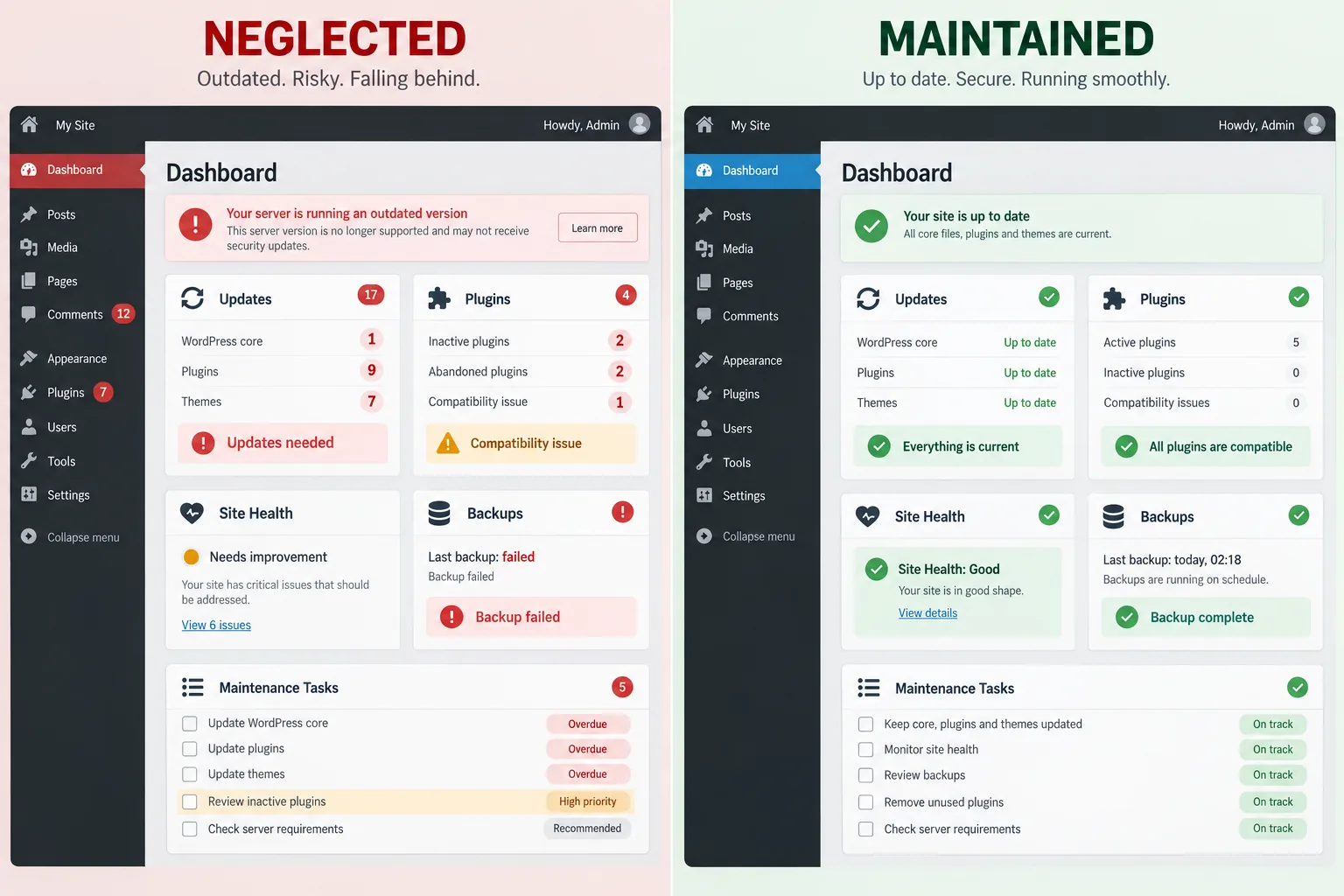
What happens inside a neglected WordPress website

WordPress is not one system operating alone. The core platform, theme, plugins, PHP version, database and hosting environment must continue working together.

WordPress says the latest major release is the currently supported version and that security updates for older branches are not guaranteed in its supported-versions documentation. Its Site Health documentation identifies outdated PHP, waiting plugin updates and failed background updates as issues that can affect security and performance.

Updates can become progressively harder

The business is no longer paying for a routine update. It is paying to untangle years of deferred decisions.

Compare the specific inclusions below before deciding whether a lower or higher figure represents the stronger value.

When a site is maintained regularly, updates can be tested in manageable increments. When it is ignored for years, one safe update may depend on several others:

  1. The server needs a newer PHP version.
  2. The old theme does not support that PHP version.
  3. The replacement theme changes page templates.
  4. Several plugins are no longer maintained.
  5. Updating the page builder breaks old modules.
  6. The backup system has not been tested.

Plugins can become abandoned or incompatible

Plugins control important functions such as forms, scheduling, SEO, security and backups. A developer may stop maintaining a plugin. Another plugin may introduce a conflict. A feature may rely on a version of PHP that the hosting provider no longer supports.

WordPress recommends keeping plugins and themes current for security and advises maintaining recoverable backups before updates in its plugin and theme update guidance.

Updates should not be applied blindly to a complicated business site. They should be backed up, tested and checked. Avoiding all updates because they might cause a problem creates a larger problem later.

Old PHP can trap the website

PHP is the server-side language on which WordPress depends. PHP versions reach end of life, after which they no longer receive normal security support.

WordPress’s PHP administration guidance explains that older PHP installations may expose a site to vulnerabilities while newer versions can introduce compatibility requirements for older themes and plugins.

This is a common sign that a website has accumulated technical debt: it cannot safely move forward because too many old components depend on one another.

THE VISIBLE PAGE IS ONLY PART OF WEBSITE HEALTH

A website can still open while updates, compatibility, backups, and security problems accumulate behind it. Regular maintenance keeps manageable work from becoming a complicated recovery project.

Click or tap the visual to enlarge it.

Security is one reason website maintenance cannot be optional

Technology vulnerabilities are discovered after products are released. Updates often include patches that close those weaknesses.

CISA’s update guidance encourages prompt updates because attackers can use known flaws to access devices and systems.

Website maintenance cannot guarantee that a site will never be attacked. It can reduce avoidable exposure and improve the business’s ability to recover.

Small businesses are not protected by being small. Automated attacks do not need to know the company’s annual revenue before scanning an outdated plugin.

A basic protection plan should address:

  • Tested backups stored separately from the live website
  • Current supported technology
  • Multifactor authentication where available
  • Least-necessary user permissions
  • Malware and file-change monitoring
  • Secure hosting and HTTPS
  • Removal of unused accounts, plugins and themes
  • Documented recovery procedures
  • Prompt investigation of unexpected changes

Design ages because customer expectations change

Visitors do not compare a small business website only with similarly sized competitors. They compare every digital experience with the best websites and apps they use each day.

An old design can make an established business appear less active than it really is. That judgment may be unfair, but it still affects whether a prospective customer calls.

The solution is not to chase every visual fashion. It is to prevent the experience from becoming an obstacle.

Current users expect:

  • Pages that work on their phone
  • Readable text without zooming
  • Clear navigation
  • Obvious contact and booking options
  • Fast, stable loading
  • Authentic images and current information
  • Forms that are short and reliable
  • Secure connections
  • Accessible controls
  • Immediate confirmation after an action

Accessibility standards and user needs continue evolving

Accessibility is not a one-time plugin or launch checklist. Content, forms, navigation and third-party tools change after the website launches.

The World Wide Web Consortium’s WCAG overview explains that accessible web content should be perceivable, operable, understandable and robust. W3C encourages using the latest WCAG version.

These issues can exclude customers and increase business risk. Accessibility should be reviewed as the site and its content evolve. Legal requirements vary by organization and jurisdiction, so businesses should obtain qualified legal guidance rather than relying on an automated score as a legal conclusion.

An aging site may have:

  • Low color contrast
  • Missing keyboard focus indicators
  • Menus that cannot be operated without a mouse
  • Images without useful alternative text
  • Unlabeled form fields
  • Error messages that are difficult to understand
  • Small touch targets
  • Video without captions
  • Headings selected for appearance instead of structure

An old website can limit SEO and AI search visibility

Search optimization depends on more than keywords. Search systems must be able to crawl, render, index and understand the website.

Older sites may suffer from:

Google’s current technical SEO guidance emphasizes secure, usable, mobile-friendly and fast experiences. Google’s generative AI optimization guidance also explains that traditional SEO foundations remain relevant to visibility in AI-powered Search features.

AIO and GEO do not make website maintenance less important. They increase the need for clear, current, crawlable information that can be understood and attributed.

AI systems cannot reliably represent information the company never published or allowed to become obsolete.

The website should accurately explain:

  • Slow templates and excessive scripts
  • Important content hidden in unreliable widgets
  • Duplicate pages and inconsistent canonical signals
  • Confusing internal links
  • Missing or inaccurate structured data
  • Broken redirects from earlier redesigns
  • Pages that do not satisfy current search intent
  • Thin service explanations
  • Outdated author, business or location information
  • Mobile experiences that discourage engagement

Two similar totals can represent very different levels of research, implementation, testing, and continuing support. Compare the specific inclusions below before deciding whether a lower or higher figure represents the stronger value. Cost depends on the work, responsibility, and risk included—not merely the label placed on the service.

Review the following factors:

  • What the business does
  • Who provides the expertise
  • Where it operates
  • Which customers it serves
  • What makes its process different
  • Which claims it can support
  • How a prospective customer takes the next step

Content can become old even when the design still looks current

A website is outdated when it no longer reflects the business.

Keeping content current supports customers, search engines and AI answer systems. Our guide to how often a business should publish and update articles explains how ongoing content can support traditional and AI search without publishing merely to satisfy a quota.

New photography and video can also make a mature website feel genuinely current. Do Web Designers Provide the Copy and Images for a Website? explains how client photography, custom creative and licensed stock media should be planned.

Common examples include:

  • Services the company no longer provides
  • Missing services that now produce most of its revenue
  • Former employees presented as current team members
  • Old addresses, hours or service areas
  • Expired offers
  • Awards without dates or context
  • Unsupported “best” or “leading” claims
  • Old portfolio examples
  • Privacy information that does not match current tools
  • Articles that contain superseded guidance

Performance problems accumulate quietly

No single addition appears disastrous. The combined page can become heavy, unstable and difficult to use on a mobile connection.

Performance work is not a one-time score obtained before launch. It requires reevaluation as the site changes.

A website may begin quickly and slow down as people add:

  • Large uncompressed images
  • Multiple font families
  • Third-party tracking scripts
  • Chat, scheduling and review widgets
  • Advertising pixels
  • Page-builder add-ons
  • Popups and animation
  • Embedded video
  • Plugins that load assets on every page

Old websites can fail as sales tools before they fail technically

The website may stay online while becoming less effective at producing business.

Uptime is not the same as usefulness. A website can be technically alive and commercially absent.

Warning signs include:

  • Visitors reach the site but rarely contact the company.
  • Mobile users abandon important pages.
  • The company cannot build a focused landing page for advertising.
  • Forms ask for too much information or fail silently.
  • Calls go to an old number or the wrong location.
  • The site does not answer the questions salespeople repeatedly receive.
  • Customers cannot tell which service fits their situation.
  • Strong reviews and credentials are difficult to find.
  • The business cannot measure which pages produce leads.

How often should a business website be rebuilt

There is no rule requiring a rebuild every three years or five years.

SoFloWeb recommends treating three to five years as a formal evaluation window for many small-business websites. At that point, compare the current site with the company’s technology, services, brand, customers, competition and growth plans.

Rebuild sooner when

A rebuild deserves priority when the current foundation makes ordinary maintenance unsafe, inefficient, or structurally limiting. Continuing to patch an obsolete system can increase risk while delaying the work the business actually needs. Use the conditions below to distinguish a foundational problem from a site that simply needs focused improvement.

Review the following factors:

  • The site cannot run a supported server environment safely.
  • Essential plugins or themes are abandoned.
  • Ordinary updates repeatedly break the site.
  • The mobile experience is fundamentally poor.
  • The architecture cannot support current services or locations.
  • The site was built on a leased or nonportable system the business is leaving.
  • The company has materially changed its positioning or business model.
  • Accessibility and conversion problems are embedded across every template.
  • Development work costs more because of accumulated technical debt.
  • A previous redesign damaged search visibility and the structure cannot be repaired efficiently.

Keep improving the existing site when

The correct question is not simply “How old is the website?” It is “How much useful life remains in its foundation?”

Continuing to improve the existing site makes sense when its foundation remains supportable, adaptable, and safe to maintain. A healthy system can often accept better content, design refinements, performance work, and new functionality without starting over. Confirm the conditions below before replacing an asset that still has useful life.

Review the following factors:

  • Core systems remain supported and maintainable.
  • The theme or custom framework can be updated safely.
  • Templates work well across devices.
  • Content structure supports growth.
  • Performance problems have identifiable fixes.
  • The business can edit the site efficiently.
  • Search visibility and conversions are healthy.
  • The remaining problems are focused rather than structural.

Do not rebuild a website just to make it look new

A careless rebuild can create more damage than an older design.

Before rebuilding, preserve a complete URL inventory, identify high-performing pages, map redirects, document analytics, retain valuable content and test the new site before launch.

If rankings have already declined after an agency rebuild, SEO Rankings Dropped After Hiring an Agency? What Went Wrong and How to Recover explains the most common failures and the recovery process.

The goal is not a new-looking website at any cost. The goal is a stronger business asset without discarding value the old site earned.

Changing platforms, themes, URLs, navigation and content can affect:

  • Indexed pages
  • Rankings and AI-search visibility
  • External links
  • Local landing pages
  • Analytics history
  • Forms and call tracking
  • Structured data
  • Advertising destinations
  • Bookmarks and customer habits

Why small businesses need a recurring web-development budget

A small business may not need a full-time developer. It still needs a plan for the technology on which its marketing depends.

Waiting until the website fails creates emergency spending. Emergency work is often more expensive because the developer must diagnose an undocumented system while the business is losing calls, leads or access.

A practical annual website budget can contain four categories.

1. Infrastructure

Compare the specific inclusions below before deciding whether a lower or higher figure represents the stronger value. Infrastructure depends on the work, responsibility, and risk included—not merely the label placed on the service. Two similar totals can represent very different levels of research, implementation, testing, and continuing support.

Review the following factors:

  • Domain renewal
  • Hosting
  • Email delivery
  • Security certificates where applicable
  • Backup storage
  • Essential platform licenses

2. Maintenance and protection

Maintenance and protection depends on the work, responsibility, and risk included—not merely the label placed on the service. Two similar totals can represent very different levels of research, implementation, testing, and continuing support. Compare the specific inclusions below before deciding whether a lower or higher figure represents the stronger value.

Review the following factors:

  • Tested platform updates
  • Security and uptime monitoring
  • Backup verification
  • Form and conversion testing
  • User-access review
  • Performance and Site Health review

3. Growth and improvement

Two similar totals can represent very different levels of research, implementation, testing, and continuing support. Compare the specific inclusions below before deciding whether a lower or higher figure represents the stronger value. Growth and improvement depends on the work, responsibility, and risk included—not merely the label placed on the service.

Review the following factors:

  • New service or location pages
  • Article development and updates
  • Original photography and video
  • Landing pages
  • Conversion improvements
  • Accessibility remediation
  • Analytics and AI-search measurement

4. Replacement reserve

Set aside part of the annual marketing or technology budget for a future redesign or rebuild. The amount depends on the site’s complexity, integrations and expected replacement window.

The planning formula is simple:

Annual website budget = infrastructure + maintenance + improvements + future replacement reserve

This does not mean spending money for the sake of keeping an agency busy. Every activity should protect, measure or improve an identified business asset.


A realistic website-care schedule

Ongoing or automated monitoring

Compare the specific inclusions below before deciding whether a lower or higher figure represents the stronger value. Ongoing or automated monitoring depends on the work, responsibility, and risk included—not merely the label placed on the service. Two similar totals can represent very different levels of research, implementation, testing, and continuing support.

Review the following factors:

  • Uptime
  • Security events
  • Backup completion
  • Form delivery
  • Domain and certificate expiration

Weekly or monthly review

The exact frequency depends on site risk, integrations and change volume. A high-traffic website with several business-critical connections requires a different process from a five-page informational site.

A weekly or monthly review should catch maintenance, form, spam, and security issues before they become long-running problems.

Review the work and evidence expected during this stage:

  • WordPress, theme and plugin updates
  • Visual and functional checks after updates
  • Spam and failed form review
  • User and security alerts
  • Critical conversion paths

Quarterly review

Quarterly review should step back from routine maintenance and test whether the website is still performing reliably across devices and business workflows. Access, analytics, redirects, and broken links can drift even when the site appears normal. Documenting the findings creates a practical improvement list for the next quarter.

Review the work and evidence expected during this stage:

  • Performance on representative devices
  • Analytics and conversion tracking
  • Administrator and vendor access
  • Broken links and redirects
  • Plugin necessity and license status
  • High-value page accuracy
  • Search and AI visibility trends

Annual strategic review

An annual strategic review asks whether the website still reflects the business, supports current customers, and rests on a healthy technical foundation. It should consider design, content, accessibility, architecture, and the integrations the company now depends on. The result should guide investment for the coming year rather than merely restate maintenance tasks.

Review the work and evidence expected during this stage:

  • Business services, positioning and locations
  • Design and brand alignment
  • Accessibility
  • Technical architecture
  • Hosting and PHP support
  • Content gaps
  • Customer questions
  • Conversion performance
  • Search-result changes
  • Whether a refresh, redesign or rebuild should enter the budget

Questions to ask during an annual website review

If the company cannot answer the account-control question, use Who Should Own Your Website and Marketing Accounts? to document the domain, hosting, website, analytics and platform access before starting a redesign.

Cost depends on the work, responsibility, and risk included—not merely the label placed on the service.

Ask and document the following:

  1. Does the website still describe the business accurately?
  2. Can customers complete important tasks easily on a phone?
  3. Are the platform, PHP, theme and plugins supported?
  4. Can updates be installed safely and restored if necessary?
  5. Are forms, calls, scheduling and payments tested?
  6. Does the business control its domain, hosting and administrator accounts?
  7. Can another qualified developer understand and maintain the site?
  8. Are high-value pages gaining or losing organic and AI visibility?
  9. Does the site meet current accessibility expectations?
  10. Can the current structure support the next three years of growth?
  11. Are privacy, analytics and consent tools accurate?
  12. Would a refresh solve the problems, or is the foundation the problem?

How to modernize without shaming the original decision

An old website is not proof that the business owner was careless. Many websites were good decisions when they launched. They reflected the available technology, budget and business needs of that time.

The business may also have spent years prioritizing employees, equipment, customers and operations. Those investments matter.

Modernization should be a business decision, not an embarrassment. The goal is to prevent yesterday’s successful project from becoming tomorrow’s emergency.

The constructive approach is to assess the website as it exists today:

  • What still works?
  • What has become risky?
  • What is frustrating customers or staff?
  • What value should be preserved?
  • What can be improved incrementally?
  • What needs a new foundation?

SoFloWeb’s perspective

After more than 25 years of watching websites and digital marketing evolve, Maarit Durity has seen the same pattern repeatedly: a business invests in a website, launches it and reasonably assumes the project is finished.

The website then becomes more important while receiving less attention. It collects content, plugins, tracking tools and technical workarounds. Eventually, the company needs a change the old structure cannot support safely.

SoFloWeb believes businesses should own their website, understand its condition and budget for its continued development. That does not mean rebuilding on an arbitrary schedule. It means maintaining the asset, measuring whether it still works and planning replacement before urgency removes the company’s choices.

The strongest website is not the newest one. It is the one that remains secure, current, useful, editable and aligned with the business.

PRACTICAL QUESTIONS

Website Age, Maintenance and Rebuild Questions

Straightforward answers about how long a website can remain useful, when ongoing maintenance is enough, and when an aging technical foundation makes a redesign or rebuild the more responsible decision.

CLEAR ANSWERS, USEFUL CONTEXT

These answers summarize the most common follow-up questions without replacing the details and qualifications explained throughout the article.

READ THE FULL ANSWER BEFORE MAKING THE DECISION

A well-built and well-maintained website may remain useful for many years. Many small businesses should conduct a formal redesign or rebuild evaluation around three to five years, but condition and business needs matter more than age alone.

No. If the platform is supported, the structure remains useful and ongoing improvements are practical, a refresh may be enough. Rebuild when the foundation limits security, compatibility, editing, customer experience or growth.

A redesign primarily changes presentation and user experience while preserving much of the underlying system. A rebuild replaces substantial parts of the technical foundation, templates, code or content structure.

Sometimes. A developer should assess WordPress core, PHP, theme, plugins, page builder, custom code and backups. When several abandoned components depend on one another, rebuilding may be safer and more economical than forcing them forward.

Warning signs include failed updates, PHP errors, broken features, an abandoned development history, incompatibility notices and the inability to test with supported WordPress or PHP versions. Back up and test changes before replacing critical plugins.

Age itself is not a ranking penalty. An old site can lose visibility when it becomes slow, inaccessible, technically unreliable, difficult to crawl, inaccurate or less useful than competing pages.

Not automatically. AI visibility still depends on strong traditional foundations: accessible pages, clear content, reliable crawling, useful expertise and current information. A rebuild is justified when the existing website prevents those foundations from being improved effectively.

There is no universal amount. Budget for infrastructure, security and maintenance first; then add content and conversion improvements plus a reserve for future redesign or rebuilding. Complexity, integrations and business dependence determine the appropriate level.

Automatic updates can be appropriate for some components, but a business website should also have reliable backups and post-update checks. Complex or revenue-critical sites may need staging and controlled testing before major updates.

Preserve valuable URLs, content, rankings, links, analytics, form requirements, structured data, media, account access and conversion history. Plan redirects and test the new site before changing the live website.

Maarit Durity, owner of SoFloWeb

AUTHOR + TECHNICAL REVIEW

Maarit Durity

Owner, website strategist, designer, developer, SEO practitioner, and content strategist at SoFloWeb.

Maarit has worked in websites and digital marketing for more than 25 years. She writes from direct experience planning, building, rebuilding, optimizing, and measuring business websites—and takes responsibility for the technical review of this article.

Learn more about SoFloWeb and Maarit’s experience →