VIDEO CALL REQUEST

Choose a Time to Talk

Select an available 45-minute window, then tell us how to reach you. We will confirm the appointment and send the Google Meet details after reviewing the request.

45-minute video call. Times shown are Eastern. At least one day’s notice is required. Faded blocks are unavailable.

START A CONVERSATION

Tell Us What the Business Needs

Share the same project details requested on our homepage in two short steps. We will review the information and respond using the communication method you select.

ABOUT 2 MINUTESTwo focused steps
NO OBLIGATIONA practical first conversation
PERSONALIZED RESPONSEBased on the business and its goals
QUOTE & PROJECT DETAILS

Request a Website & Marketing Proposal

Tell us what the business needs, what is changing, and which services you are considering. We will review the details before recommending the most useful next step.

FOUR FOCUSED STEPSAbout 3 minutes
NO OBLIGATIONClear guidance without pressure
PERSONALIZED REVIEWBased on the business and its goals
Showroom owner waiting beside a desk phone and appointment book

Home   /   Digital Trends   /   Website Traffic but No Leads

WEBSITE TRAFFIC + LEAD CONVERSION

Website Traffic but No Leads?
Find the Conversion Problem

Traffic does not become business automatically. Each step from the search to the completed inquiry has to work.

THE SHORT ANSWER

Traffic Creates Leads Only When the Entire Conversion Path Works

Start by checking what the office actually received. If an inquiry reached the inbox but never appeared in analytics, the first repair is tracking. If the visitor saw a confirmation and nobody received the message, investigate delivery. If both are working, look at who visits the page and whether the offer fits the work those people need.

Trace a missed inquiry: Trace a visit through to a received inquiry. Poor traffic quality, page friction, tracking errors, and missed follow-up each need a different fix.

IN THIS ARTICLE

Why the right visitors matter more than the traffic total

A traffic report counts visits. It does not explain whether those visitors are potential customers.

A Florida contractor may receive hundreds of visits to an article explaining how to perform a repair. Many readers may live outside the service area or want to complete the work themselves. The article can be useful and rank well without producing immediate calls.

By contrast, a service page that attracts 40 people searching for a specific repair in the company’s city may produce more business.

Google explains that Search Console and Google Analytics measure different parts of the journey: Search Console shows how people encountered and clicked the site in Google Search, while Analytics shows what they did after arriving. Both views are needed.

Start with the page that should be producing inquiries. Look at the searches that brought people there, then compare the location, device and source of its visitors with the leads the office received. A surge in first-time readers of a national repair guide can depress the sitewide conversion rate while local service bookings hold steady. The page-level comparison tells you whether there is a sales problem to solve.

First confirm that lead tracking works

Google Analytics allows a business to mark important actions as key events, but the event must first represent a real, successfully completed action.

Send one clearly marked test inquiry and note the time. Check what the visitor sees, what the office receives and what appears in Analytics. A confirmation on the phone with no corresponding message in the office points to a delivery problem. A message in the inbox with no recorded event points to measurement. Two events for one inquiry can make a weak campaign look healthy.

Follow the inquiry across the handoff

Try submitting an incomplete form and opening the thank-you page directly. Either action can expose a tag that counts attempts as leads. Repeat the test on mobile and follow any booking link through the external provider. A tap on a phone number shows intent to call. Compare it with answered calls before counting it as a conversation.

If the figures still disagree, compare individual records. A changed form identifier, consent settings, spam or a missing source in the sales system can each explain part of the difference. Record what you can confirm and keep the unexplained gap visible.

Search intent may not match the offer

Two people searching for roof leaks can want very different things. “Why is the ceiling wet after heavy rain?” calls for an explanation. “Roof leak inspection near me” calls for a local provider and an available appointment. Between those searches, the same homeowner might compare repair methods or look up a company a neighbor recommended.

Read the queries beside the pages that earned the clicks. An educational article can do its job by helping someone recognize when a professional inspection is warranted. Give that reader a natural link to the inspection service. If the guide attracts readers across the country while the local service page earns few impressions, improving the service page is a better first move than putting a larger contact button on the guide.

A qualified lead depends on every step in the customer path
VISIBILITYThe right person finds the page

Traffic quality begins with the query, source, location, audience, and reason for the visit.

RELEVANCEThe page matches the need

The visitor should quickly understand the service, fit, evidence, location, and expected next step.

ACTIONThe conversion path works

Forms, calls, scheduling, mobile controls, privacy expectations, and confirmation messages must function.

FOLLOW-UPThe business completes the handoff

Fast, informed response determines whether a valid inquiry becomes a real opportunity.

Give the visitor a reason to get in touch

If an advertisement promises emergency repair but lands on a generic homepage, the visitor must search again inside the website. If a search result promises pricing but the page avoids every cost question, the visitor may return to Google.

Imagine arriving from an emergency repair ad with water coming through the ceiling. A page that names the repair, confirms the town and explains who answers after hours settles three questions immediately. A photo of a comparable repair and a working phone number give the visitor enough evidence to act. A company history can wait until the urgent questions have answers.

Our guide to the post-click landing-page experience explains why accurate targeting cannot compensate for a confusing destination.

The offer may be unclear

“Contact us to learn more” leaves a visitor guessing what the company will do. A homeowner who needs the earliest available appointment can act on “Check inspection availability.” An architect seeking a bid may prefer “Send plans for review,” especially if the page explains who reviews the drawings and when to expect a reply.

Pick the next step the business can reliably deliver. Give it a clear place on the page and explain the commitment it involves. A secondary phone number can help someone who needs an answer today. A row of equally prominent buttons for chat, bookings, quotes and a newsletter makes that person choose a route before they know where it leads.

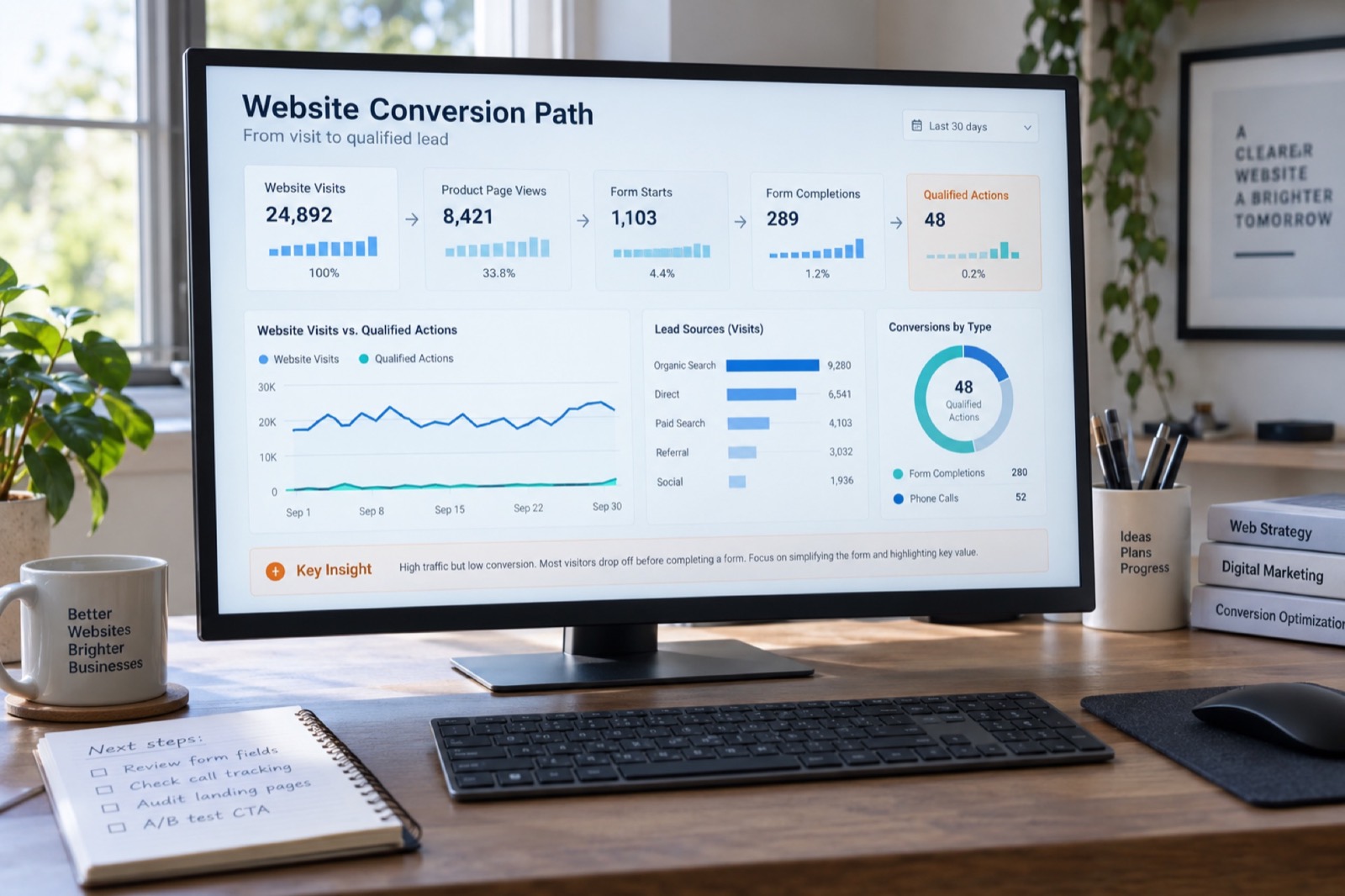
FIND THE BOTTLENECK BEFORE BUYING MORE TRAFFIC

Visits, landing-page engagement, form starts, completed inquiries, calls, and qualified outcomes belong in one diagnostic view.

Click or tap the visual to enlarge it.

The website may not establish enough trust

Think about what a stranger must believe before handing over a phone number. For a substantial repair, a photograph of work in a nearby neighborhood, a named project lead and an explanation of the inspection are more persuasive than a claim to be the area’s leading contractor. A relevant license, review or case study gives the visitor something they can verify.

Put that evidence where the decision happens. Beside an estimate request, explain who will call, what they need to know and whether there is a visit fee. For a service that involves personal information, identify who receives the inquiry and link to the privacy information. Make dates, contact details and professional credentials easy to check.

Find where the inquiry breaks

Open the form and ask the person who returns inquiries what they need for the first useful reply. A roofer may need a ZIP code to confirm coverage and a number for the callback. A full street address and photographs may make more sense after the office establishes that it can help. Explain the reason for an unusual field when it really is essential.

Baymard’s checkout usability research concerns online purchases. A quote request is a different transaction, but it raises a similar practical question. How much work must someone do before they receive anything useful? Try the form as a first-time visitor. Account creation, mandatory uploads and detailed budget questions each need to earn their place.

The form may be broken even when it looks normal

A form can appear to work from the customer’s side while the office never sees the request. A success message may appear before email delivery fails, or the message may go to spam. A form update can also break the connection that assigns the lead in the sales system.

Send a test from a phone using autofill. Leave a required field blank once and see whether the error explains how to recover without losing the other answers. If the form asks for a file or uses a CAPTCHA, complete that step too. After submission, compare the confirmation and automated reply with the record the office actually received. Repeat this check after changes to the form, email service or booking tool.

Mobile visitors may face a different website

A page can look polished on a designer’s desktop and fail on the phone where customers actually use it.

Google’s Core Web Vitals guidance measures real-world loading performance, responsiveness and visual stability. Good scores do not guarantee leads, but serious performance problems can make the conversion path harder to use.

Start where a customer would start, on a real phone using cellular data. Open the service page, dismiss any consent or chat panel, and try calling or requesting an appointment with one hand. Watch what happens when the keyboard appears. A sticky footer may cover Submit, an address field may summon the wrong keyboard, or a late-loading image may move the button just as you tap.

Compare mobile and desktop outcomes for the same landing page and source. If mobile visitors start the form at a similar rate but rarely finish it, that narrows the investigation considerably. It also gives you a way to check whether the fix helped.

When a slow page costs an inquiry

A page may show its headline quickly while the booking calendar below it remains blank. Time the action a customer came to take. Check whether the calendar responds, whether the page shifts as a video loads and whether a visitor can tap the main button while chat and review widgets start up.

The remedy depends on what is slow. One oversized project image calls for an image fix. A delay across simple pages as well as complex ones warrants a look at hosting and caching. If only the booking step stalls, investigate the widget and the scripts that run before it. Retest the complete appointment path after the change.

Why some inquiries never become appointments

Avoiding every pricing question can send qualified visitors to a competitor who explains the cost factors more openly.

A custom project can have a useful pricing page even when the final price requires an inspection. Describe a typical job, what its price includes and what would change the scope. If the business has a minimum project size or offers financing, say so before asking the visitor to book. A buyer comparing two estimates can then see whether they cover the same work.

Our Florida web development cost guide uses ranges and scope explanations without pretending every website has the same price. This approach can qualify leads rather than merely increasing their number.

Traffic may come from outside the service area

A visit from another state may be valuable to a national supplier and irrelevant to a contractor with a one-hour travel radius. Compare the locations of actual inquiries with the pages and searches bringing visitors in. A distant visitor arranging work on a local property may be a good prospect, so the job address is a better qualification signal than the visitor’s apparent location alone.

Make the service boundary easy to understand. Name the communities the crew visits, explain any travel restrictions and show examples of local work. If the team offers installations countywide but emergency repairs only near its shop, state that distinction where someone requests service. Building a page for every town will do little for a customer who still cannot tell whether the crew will come.

The business may be slow to answer

Take a recent inquiry and follow the timestamps. When did the customer submit it, who received it and when did someone make a useful reply? A Friday evening request can sit in a shared inbox until Monday while an automated email promises an immediate callback. The website generated a lead, but the promise and the staffing did not line up.

Give missed calls and online requests a named owner and a fallback when that person is away. Tell visitors when to expect a response after hours. In reporting, distinguish received inquiries from people reached, qualified appointments and completed sales. Those numbers tell the office where a lead stopped moving.

The website may receive leads the business does not want

Read a sample of inquiries the team turned down. If several homeowners want small repairs and the company only takes full renovations, the page may be describing “home improvement” too broadly. A short description of a typical project, its minimum scope and the schedule the crew can offer lets the visitor decide whether to call.

Look for a pattern before adding another required field. A geographic mismatch belongs on the service page. A genuine eligibility requirement belongs beside the offer. When the page does more of that work, fewer submissions can still mean more conversations the business wants.

AI and organic visibility need conversion paths too

AI Overviews, AI Mode and answer engines can introduce people to a company before the traditional website click. A reader may see the business cited, search the brand later and enter through the homepage rather than the original article.

Picture someone who first discovers the company through an answer about roof leaks. They may read the guide that day and search the company name after the next storm. The later visit may enter through the homepage, so the final click alone cannot establish how they first heard of the business. A simple “How did you hear about us?” can add context when the customer volunteers it.

Make both routes useful. The guide can point a local homeowner toward an inspection when the symptoms warrant one. The homepage can make the same service and coverage area easy to find for a returning visitor. Someone still researching should be able to finish reading the answer without an interruption.

How to diagnose website traffic without leads

Use one service page and one recent period for the first pass. Working through a single path makes it easier to identify a repair you can test.

  1. Define the inquiry you want. Agree with the office on the service, area and circumstances that make a lead useful.
  2. Prove the handoff works. Send a marked test from a phone. Confirm receipt, assignment and one recorded completion. Check the phone route separately.
  3. Match the visit to the offer. Read the search and the landing page together. Check whether a person with that need can identify the service, evidence and next step.
  4. Find the first break. Compare starts, completed inquiries, callbacks and appointments. Inspect a few individual records at the point where the counts diverge.
  5. Repair and retest. Fix the earliest confirmed failure and repeat the same journey before changing the campaign or redesigning the page.

Metrics that belong together

Search impressions and clicks show whether the result earned attention for the searches where it appeared. Once visitors arrive, landing-page engagement and device data can help locate a difficult step. Neither a long visit nor a deep scroll establishes that someone wanted a quote. Compare those signals with completed forms, answered calls and bookings.

What you seeCompare it withWhat to check next
Search clicks riseVisits to local service pagesCheck which queries and locations account for the increase. A guide may be reaching readers outside the service area.
Visitors start the formSuccessful submissions on the same device typeTry the form on a phone. Watch for a field error, an upload that stalls or a button hidden by the keyboard.
The site confirms inquiriesMatching inbox or CRM recordsTrace a missing record by time. Check email delivery, routing and duplicate tracking events.
The office receives inquiriesQualified appointments and salesReview service fit and callback times. Record why a reachable prospect did or did not book.

What a gap in the numbers can tell you

Suppose a service page generates 20 form starts and eight confirmations in a week. The office finds six matching inquiries and books two appointments. Before rewriting the page to attract more visitors, trace the two confirmed inquiries missing from the office records. Then examine whether the other four received inquiries involved the right service and location. The gap before receipt and the gap before booking call for different repairs. These figures illustrate the method and are not conversion benchmarks.

Follow qualified appointments through to proposals, sales and revenue over a period long enough for customers to decide. A rise in impressions can be encouraging early evidence. The business case becomes clearer when those searches bring people the team can serve.

What not to do when leads are low

A quiet month can prompt several changes at once. If the company buys more clicks, adds a pop-up and rewrites the form on the same day, it will have a hard time learning which change mattered. Pick the clearest failure first. A form that never reaches the office is a better starting point than the color of its button.

Keep changes tied to the evidence. A guide that answers a research question may still introduce future customers. A field that looks inconvenient may be essential to confirm service coverage. Judge a change against the number of useful inquiries the office receives and can act on, and allow for differences in traffic mix and sales timing.

When the website needs repair, redesign or rebuilding

A focused repair may be enough when the site has a sound foundation and one measurable issue, such as a broken form, weak service-page opening or confusing call to action.

A broader redesign may be appropriate when the information hierarchy, mobile layouts, brand presentation and conversion paths are consistently weak.

A rebuild may be necessary when obsolete technology, poor templates, undocumented integrations or structural performance problems prevent reliable improvement. Our guide to deciding when an older website needs updating, redesigning or rebuilding explains the difference.

SoFloWeb's perspective

Traffic should be evaluated as part of a business system.

At SoFloWeb, we look at where visibility occurs, whether the searcher fits the service, which page receives the visit, how the page functions and whether the lead reaches the business. Ranking reports matter, but they do not replace form testing, conversion measurement or qualified-lead review.

The right solution might be SEO, content, development, landing-page work, analytics repair or a better internal response process. Diagnosing the actual break is more responsible than selling the same service for every symptom.

PRACTICAL QUESTIONS

Website Traffic and Lead Questions

Straight answers about traffic quality, search intent, landing pages, trust, forms, calls, mobile usability, tracking, follow-up, and when a website needs larger changes.

CLEAR ANSWERS, USEFUL CONTEXT

These answers summarize the most common follow-up questions without replacing the details and qualifications explained throughout the article.

READ THE FULL ANSWER BEFORE MAKING THE DECISION

The traffic may be informational or outside the target market, the offer may be unclear, the page may lack trust, the checkout may create friction, or sales tracking may be incomplete. Review the journey from traffic source through purchase confirmation.

There is no universal rate. Industry, offer, traffic source, price, device and conversion definition all matter. Establish an accurate baseline, compare similar traffic and improve qualified outcomes rather than chasing a generic benchmark.

Yes. SEO can attract informational searches, irrelevant geography or people interested in a topic but not the service. A complete strategy also builds commercial service pages, local relevance and conversion paths.

Yes. Slow loading, delayed interaction and layout shifts can frustrate visitors or prevent them from completing an action. Speed is one part of the complete user experience.

Submit it on desktop and mobile, verify the success state, confirm email and CRM delivery, and check that analytics records one successful event. Repeat this test regularly.

Not automatically. One clear primary action supported by relevant alternatives is often easier to understand than several competing buttons, pop-ups and widgets.

The messaging may be too broad, the website may omit service-area or minimum-project details, or campaigns may target the wrong searches. Define a qualified lead and compare the source and landing page of accepted versus rejected inquiries.

It can influence discovery and later brand searches, but attribution may be less direct. Continue measuring branded search, assisted journeys and conversions while creating useful paths from informational content to relevant services.

Maarit Durity, owner of SoFloWeb

AUTHOR + TECHNICAL REVIEW

Maarit Durity

Owner, website strategist, designer, developer, SEO practitioner, and content strategist at SoFloWeb.

Maarit has worked in websites and digital marketing for more than 25 years. She writes from direct experience planning, building, rebuilding, optimizing, and measuring business websites—and takes responsibility for the technical review of this article.

Learn more about SoFloWeb and Maarit’s experience →